Moorpark College

Secondary Menu

  • Academic Calendar
  • Class Schedule
  • Canvas
  • Catalog
  • En Español
  • Give
  • MyVCCCD
  • Search
  • Alerts
  • About
    • About Moorpark College
    • Accreditation
    • Alumni
    • Employee Directory
    • Employment
    • Foundation
    • Our Mission, Values and Vision
    • Administration
    • College Committees
    • College President's Office
    • Institutional Effectiveness, Grants and Planning
    • VP of Academic Affairs and Student Learning
    • VP of Business and Administrative Services
    • VP of Student Support
    • Community and College Resources
    • Student Achievement Data
    • Campus Emergency Plan
    • College Events Calendar
    • College Maps and Parking
    • College Newsroom
    • College Safety (Police)
  • Admissions & Aid
    Raider Central Basic Needs logo
    Raider Central (Basic Needs)
    Meeting basic needs is essential to your quality of life.
    Explore Resources
    • Admissions
    • Academic Calendar
    • Bachelor Degree Program
    • Dual Enrollment (K-12 Students)
    • International Students
    • New Student Orientation
    • Registration Guide
    • Financial Aid
    • Financial Aid Forms
    • Raider Central (Basic Needs)
    • Scholarships
    • The Moorpark College Promise
    • Records
    • FERPA (Student Privacy)
    • Records Office Forms
    • Residency
    • Transcripts Request
    • Withdrawal Procedures
  • Academic Programs
    Academic Counseling
    Academic Counseling
    Schedule an appointment with an Academic Counselor.
    Make an Appointment
    • Areas of Interest
    • Program Mapper
    • College Programs & Courses
    • Bachelor Degree Program
    • Career Education
    • Class Schedule
    • Honors Program
    • Online Learning
    • PACE (Online Degrees)
    • Resources
    • Bookstore
    • College Catalog
    • Impacto (STEM)
    • Library
    • ZTC (Zero Textbook Cost)
  • Students
    Welcome Center Student Staff
    Welcome Center
    The Welcome Center’s friendly staff offer assistance to students, providing computer-related support services to ensure a successful navigation through Moorpark College.
    Learn More
    • Student Services
    • Academic Counseling
    • ACCESS (Accessibility Coordination Center and Educational Support Services)
    • Career Center
    • Child Development Center
    • College CalWORKs
    • DREAMers
    • EOPS
    • Student Business Office
    • Library
    • Student Life
    • Student Health Center
    • Outreach Office
    • Raider Central (Basic Needs)
    • Success Center: FYE/SYE
    • University Transfer Center
    • Veterans Resource Center
    • Tutoring and Learning Center
    • Associated Students
    • Athletics
    • Clubs and Organizations
    • Resolution & Grievance
    • Title IX (Sexual Misconduct)
    • Unlawful Harassment, Discrimination & Retaliation
    • Student Conduct
    • Student Parents
    • Pride Center
  • Employees
    • Committees
    • Campus Resources
    • Guided Pathways
    • Participatory Governance
    • Academic Senate
    • Board & Governance Portal
    • Classified Senate
    • VCCCD Employee Resources
    • Microsoft 365 (Outlook, OneDrive, SharePoint)
    • VCCCD Human Resources
    • Employee BIT Incident Reporting Forms
  • Apply • Enroll

Benefits Programs

Breadcrumb

  1. Home
  2. Departments
  3. Student Services
  4. Veterans Resource Center
  5. Benefits Programs

Veterans' Programs

VA Educational Benefits

The Moorpark College Veterans Resource Center provides guidance and assistance with educational benefits available to eligible veterans, active-duty service members, reservists, and military-connected dependents.

Explore the programs below to learn more about available benefits, eligibility requirements, and how to apply.

Veterans Resource Center Services
The Veterans Resource Center is here to help you navigate your educational journey, whether you are using VA educational benefits or seeking additional support during your time at Moorpark College.

Our services include:

  • VA Educational Benefits and Enrollment Certification
  • Assistance with GI Bill® educational benefits, enrollment certification, pre-enrollment guidance, and information regarding applicable housing allowances and fee reimbursement.
  • Priority Registration
  • Priority registration opportunities for eligible veteran students, including those who are not currently using VA educational benefits.
  • Academic Counseling and Educational Planning
  • Individualized counseling appointments to develop your educational plan, explore academic pathways, and support your educational goals.

You do not need to be using GI Bill® benefits to access Veterans Resource Center services.

Our team is here to support you throughout your educational journey.

The Post-9/11 GI Bill® provides educational benefits to eligible veterans and service members who served on active duty after September 10, 2001. Benefits may include tuition and fees, a monthly housing allowance, and money for books and supplies.

For eligibility requirements, benefit amounts, and application instructions, visit the VA Post-9/11 GI Bill webpage.

The Montgomery GI Bill® provides up to 36 months of educational benefits to eligible veterans and service members who meet qualifying active-duty service requirements.

For eligibility requirements, benefit amounts, and application instructions, visit the VA Montgomery GI Bill – Active Duty webpage.

This program provides up to 36 months of educational benefits to eligible members of the Selected Reserve, including the National Guard.

For eligibility requirements, benefit amounts, and application instructions, visit the VA Montgomery GI Bill – Selected Reserve webpage.

Veteran Readiness and Employment (Chapter 31)

The Veteran Readiness and Employment (VR&E) program, also known as Chapter 31, helps eligible veterans and service members with service-connected disabilities prepare for, obtain, and maintain suitable employment.

Depending on your approved rehabilitation plan, benefits may include educational counseling, college tuition and fees, required books and supplies, and a monthly subsistence allowance.

Who May Qualify?

Veterans with a VA service-connected disability rating of at least 10% may be eligible to apply. The VA determines individual eligibility and entitlement to VR&E services.

For eligibility requirements and application instructions, visit the VA Veteran Readiness and Employment webpage.

Dependants' and Survivors' Programs

This program provides educational assistance to eligible spouses and children of veterans or service members who have died, are missing, or have a permanent and total service-connected disability.

For eligibility requirements, benefit amounts, and application instructions, visit the VA Survivors' and Dependents' Educational Assistance webpage. 

CalVet College Fee Waiver

The CalVet College Fee Waiver provides eligible spouses and children of qualifying veterans with a waiver of tuition and mandatory systemwide fees at California public colleges and universities. Eligibility requirements vary by program.

How to Apply

STEP 1

  • Review Eligibility and Application Requirements.
  • Visit the CalVet College Fee Waiver webpage to review eligibility requirements and obtain the required application forms.
 
STEP 2
 
  • Submit Your Application to the County Veterans Service Office.
  • Complete your application and submit it with the required supporting documentation to your County Veterans Service Office.

Ventura County students can use the link below for local application instructions, office information, and assistance with submitting their documents.
Ventura County College Fee Waiver Program 
Application instructions, required documentation, and local office information.

Ventura County Veteran Services Office
2000 Outlet Center Drive, Suite C-220
Oxnard, CA 93036
Phone: 805-477-5155

Contact the county office for assistance with your application or to confirm current submission procedures.

STEP 3

  • Complete the VRC CalVet Fee Waiver Intake Form.
  • Once you have been approved for the CalVet College Fee Waiver, complete the Moorpark College VRC's CalVet Fee Waiver Intake Form.

This form helps our team identify and support students receiving the benefit and connect them with available VRC services.

Complete the CalVet Fee Waiver Intake Form 

Important Information
The CalVet College Fee Waiver application must be processed through a County Veterans Service Office. The Moorpark College Veterans Resource Center does not process or approve fee waiver applications. The VRC Intake Form is a separate college form and does not replace the official CalVet application or approval process.

VA Benefits Orientation Guide

MC VRC Logo

Welcome to Moorpark College! 
The Veterans Resource Center (VRC) is here to help you understand your VA educational benefits and guide you through the enrollment and certification process. To begin using your educational benefits at Moorpark College, please complete the following steps.

Important: VA Benefits Orientation
This guide provides an overview of VA educational benefits and the enrollment certification process at Moorpark College. For additional guidance about your benefits, please contact the Veterans Resource Center (VRC). Staff are available to review the requirements with you.

Complete your application for admission to Moorpark College.
Once your application is processed, you will receive an acceptance email with instructions for activating your MyVCCCD student portal.
Complete the Moorpark College Online Orientation and your applicable English and Math guided self-placement activities.
 

  • Apply to Moorpark College 

  • Complete Your College Online Orientation 

  • Complete English and Math Guided Self-Placement 

If you plan to use GI Bill® educational benefits, submit your application directly to the U.S. Department of Veterans Affairs (VA).
When completing your application, identify Moorpark College as the school you plan to attend and provide the requested information about your educational program.
Once approved, the VA will issue your Certificate of Eligibility (COE) or applicable benefit authorization documentation. You will need this document to complete your VRC Intake Form.

Apply for VA Educational Benefits 
Check Your Application Status and Obtain Your COE 

How long does it take?
The VA reports an average processing time of approximately 30 days for educational benefit applications. Individual processing times may vary.
Apply as early as possible to avoid delays in accessing your benefits.

Getting Started with Chapter 31 at Moorpark College

STEP 1

Apply for VR&E Benefits

  • Apply for Chapter 31 benefits through the VA. 

  • Once your eligibility and entitlement have been established, you will work with an assigned VA VR&E Counselor to develop an approved rehabilitation plan that identifies your educational or employment goals.

Apply for VR&E Benefits 

STEP 2
  • Complete Your Moorpark College VRC Intake.

  • Apply to Moorpark College and complete the required Veteran Student Intake Form.

  • Provide your VA VR&E eligibility or authorization documentation as instructed by the Veterans Resource Center.

  • Once your intake requirements are complete, contact the VRC to schedule an appointment with a VRC Counselor.

STEP 3

  • Develop Your Educational Plan and Register for Classes.

  • Meet with a Moorpark College VRC Counselor to develop your comprehensive educational plan.

  • Your educational plan should align with the program of study approved by your VA VR&E Counselor.

  • After completing your educational plan, register for your classes and coordinate any required documentation with your assigned VA VR&E Counselor.

STEP 4

  • Obtain Your VR&E Authorization (Tungsten).

  • Your assigned VA VR&E Counselor will arrange for the college to receive an electronic authorization identifying your approved educational program, authorized enrollment period, and applicable educational expenses.

  • The VA uses an electronic system called Tungsten to transmit these authorizations and facilitate billing for approved Chapter 31 expenses.

What is a Tungsten Authorization?

  • A Tungsten authorization is the VA's official approval for the college to provide and bill for specified educational services and expenses under your Chapter 31 rehabilitation plan.

  • It includes a Purchase Order (PO) or authorization number and identifies the approved services and applicable authorization period.

  • Important: Contact the VRC to confirm that the required authorization has been received before relying on Chapter 31 benefits to cover your tuition, fees, books, or supplies.

STEP 5

  • Request Enrollment Certification and Coordinate Your Benefits.

  • Once your educational plan, class registration, and required VA authorization are in place, follow the VRC's instructions to request enrollment certification.

  • The college will coordinate certification of your approved enrollment and the billing of authorized tuition and fees to the VA.

  • If you need required textbooks or supplies, contact the VRC for instructions on the authorization and purchasing process before making your purchases.

Important: Do not assume that all tuition, fees, books, or supplies are automatically covered. Expenses must be authorized under your approved Chapter 31 rehabilitation plan.

Maintaining Your Chapter 31 Benefits

  • Continue working with your VA VR&E Counselor and Moorpark College VRC Counselor throughout your educational program.

  • Review your educational plan each semester, report changes to your major or class schedule, and provide updated academic progress information when requested by your VA VR&E Counselor.

  • Contact the VRC and your VA VR&E Counselor before your authorization expires so that any required renewal can be coordinated for your upcoming classes.

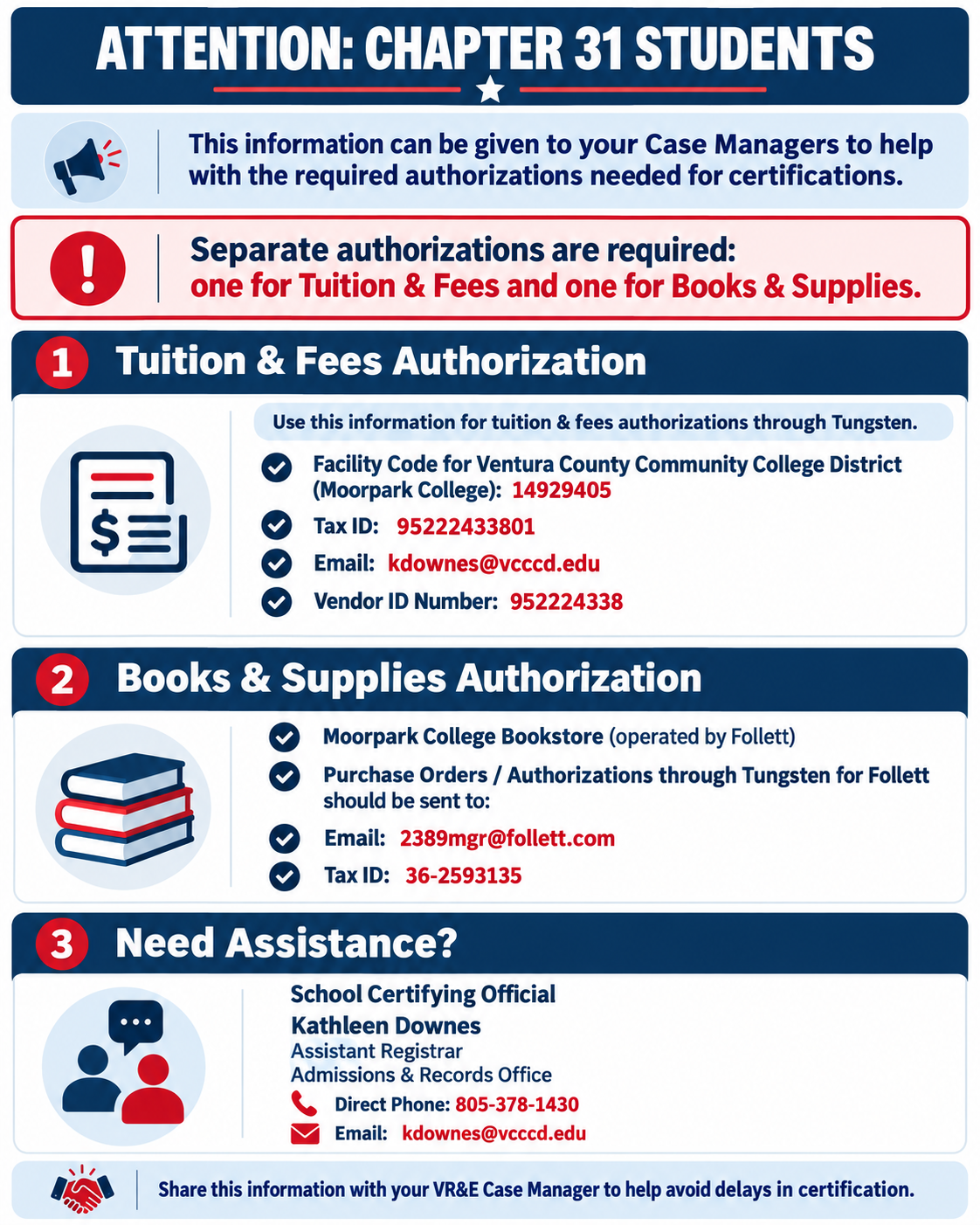
Chapter 31 Tungsten Info. for Case Managers

Once you receive your Certificate of Eligibility (COE) or applicable benefit authorization documentation, complete the Veteran Student Intake Form.
You must provide a copy of your COE or applicable benefit authorization documentation as part of the intake process.

Complete the Veteran Student Intake Form 

Important: The completed intake form and required eligibility documentation must be received before you can access VRC services or meet with a VRC Counselor for benefit-related educational planning.

Complete Your Official VRC Orientation
After completing your intake form, contact the Veterans Resource Center to complete your official VA Benefits Orientation with VRC staff.
During your orientation, you will receive information about the benefit certification process, your responsibilities as a student, and the requirements for maintaining your VA educational benefits.

Meet with a VRC Counselor
Schedule a counseling appointment to develop your comprehensive Student Education Plan (SEP).
Your educational plan identifies the courses required for your declared degree or certificate program. Only courses that meet your approved program requirements and applicable VA rules may be certified for educational benefits.
Your educational plan must be reviewed and updated each semester. If you change your major or class schedule, contact your VRC Counselor to determine whether your plan needs to be revised.

Submit Your Military and College Transcripts
Submit official transcripts from previous colleges and applicable military training to Moorpark College Admissions and Records.
Students with prior military or college coursework should complete the Transcript Evaluation Request Form, as applicable, so previous credits can be reviewed toward their educational program.

Request Your Joint Services Transcript (JST) 
Community College of the Air Force (CCAF) 
Complete the Transcript Evaluation Request Form 

Schedule Your VRC Counseling Appointment
Call the Veterans Resource Center at 805-553-4106 after completing your required intake process.

After completing your educational plan, register for your classes through the MyVCCCD student portal.
Once you have registered for all the classes you intend to take, complete the MC GI Authorization Form to request certification of your eligible courses.

  • Register for Classes – MyVCCCD Student Portal 

  • Submit the MC GI Authorization Form 

Complete the MC GI Authorization Form Last

Do not submit this form until your intake, educational plan, and class registration have been completed.
Waitlisted courses cannot be certified until you are officially enrolled.
Complete the applicable VRC authorization process each semester you intend to use your VA educational benefits.

Registration Planner image

Need help with registration?

Registration Planner Infographic

Registration Planner Video

VRC Registration Planner Guide

Changes to Your Class Schedule
Contact your VRC Counselor before adding, dropping, or withdrawing from classes.
Changes to your schedule may affect your educational plan, enrollment certification, and VA benefit payments. Dropping or withdrawing from courses may result in an overpayment or debt.

Monthly Enrollment Verification
If your VA benefit program requires monthly enrollment verification, complete it according to the VA's instructions to avoid interruptions in your benefit payments.
Complete VA Monthly Enrollment Verification

Housing Allowance and Course Selection
If you are eligible for a monthly housing allowance, your payment may depend on your enrollment status, course start and end dates, benefit eligibility, and whether your classes are online or in person.
Students taking online-only courses may receive a different housing allowance than students taking qualifying in-person courses.
Review your class schedule with your VRC Counselor before making changes that may affect your housing allowance.

View Current Post-9/11 GI Bill Benefit and Housing Allowance Rates

You may apply to Moorpark College and register for classes while waiting for your VA eligibility determination.

However, until you have completed the VRC intake and counseling requirements, provided the required benefit documentation, and had your eligible courses certified for VA educational benefits, you may be responsible for your tuition and fees.

Contact the VRC before the semester begins if you are waiting for your COE or have questions about tuition payment and benefit certification.

Guide to Military Benefits at Moorpark College 

VRC Guide to Benefits


  • Veterans Resource Center
    • Welcome!
    • Getting Started
    • Benefits Programs
    • Student Quick Reference Guide
    • Veterans Education Counseling
    • FAQ
    • Resources and Important Links
    • Active Duty Military

Share

  • facebook
  • twitter
  • linkedin
  • email

Sites Menu

  • District
  • Moorpark
  • Oxnard
  • Ventura
  • VC East

Footer Menu Social Links

  • 𝕏

Moorpark College

 7075 Campus Road
Moorpark, CA 93021

General Outreach:
 (805) 378-1400

Daytime Emergencies:
 (805) 378-1455

 mcstudentservices@vcccd.edu

Moorpark College does not discriminate on the basis of race, color, national origin, sex, disability, age or sexual orientation.

Footer Link Title #1

  • Board of Trustees
  • Personnel Commission
  • Accessibility
  • Accreditation
  • Annual Security Report
  • Clery Act
  • Decision Making
  • Donate
  • Privacy Policy
  • Sexual Misconduct/ Title IX
  • Employee BIT Incident Reporting Forms

Footer Link Title #2

  • Academics
  • Board & Governance Portal
  • Campus Map
  • Campus Safety
  • Departments
  • Employee Directory
  • Events
  • Newsroom
  • Online Learning
  • Photo and Media Gallery
  • Report a Website Issue
Moorpark College Footer Logo

Push Navigation Toggle

Mobile Menu - Top Links

  • Academic Calendar
  • Canvas
  • Class Schedule
  • Catalog
  • En Español
  • Give
  • MyVCCCD

Main Menu ( new )

  • Alerts
  • About
    • About Moorpark College
    • Accreditation
    • Alumni
    • Employee Directory
    • Employment
    • Foundation
    • Our Mission, Values and Vision
    • Administration
    • College Committees
    • College President's Office
    • Institutional Effectiveness, Grants and Planning
    • VP of Academic Affairs and Student Learning
    • VP of Business and Administrative Services
    • VP of Student Support
    • Community and College Resources
    • Student Achievement Data
    • Campus Emergency Plan
    • College Events Calendar
    • College Maps and Parking
    • College Newsroom
    • College Safety (Police)
  • Admissions & Aid
    • Admissions
    • Academic Calendar
    • Bachelor Degree Program
    • Dual Enrollment (K-12 Students)
    • International Students
    • New Student Orientation
    • Registration Guide
    • Financial Aid
    • Financial Aid Forms
    • Raider Central (Basic Needs)
    • Scholarships
    • The Moorpark College Promise
    • Records
    • FERPA (Student Privacy)
    • Records Office Forms
    • Residency
    • Transcripts Request
    • Withdrawal Procedures
  • Academic Programs
    • Areas of Interest
    • Program Mapper
    • College Programs & Courses
    • Bachelor Degree Program
    • Career Education
    • Class Schedule
    • Honors Program
    • Online Learning
    • PACE (Online Degrees)
    • Resources
    • Bookstore
    • College Catalog
    • Impacto (STEM)
    • Library
    • ZTC (Zero Textbook Cost)
  • Students
    • Student Services
    • Academic Counseling
    • ACCESS (Accessibility Coordination Center and Educational Support Services)
    • Career Center
    • Child Development Center
    • College CalWORKs
    • DREAMers
    • EOPS
    • Student Business Office
    • Library
    • Student Life
    • Student Health Center
    • Outreach Office
    • Raider Central (Basic Needs)
    • Success Center: FYE/SYE
    • University Transfer Center
    • Veterans Resource Center
    • Tutoring and Learning Center
    • Associated Students
    • Athletics
    • Clubs and Organizations
    • Resolution & Grievance
    • Title IX (Sexual Misconduct)
    • Unlawful Harassment, Discrimination & Retaliation
    • Student Conduct
    • Student Parents
    • Pride Center
  • Employees
    • Committees
    • Campus Resources
    • Guided Pathways
    • Participatory Governance
    • Academic Senate
    • Board & Governance Portal
    • Classified Senate
    • VCCCD Employee Resources
    • Microsoft 365 (Outlook, OneDrive, SharePoint)
    • VCCCD Human Resources
    • Employee BIT Incident Reporting Forms
  • Apply • Enroll

Footer Menu Social Links

  • 𝕏